
Cadpilot
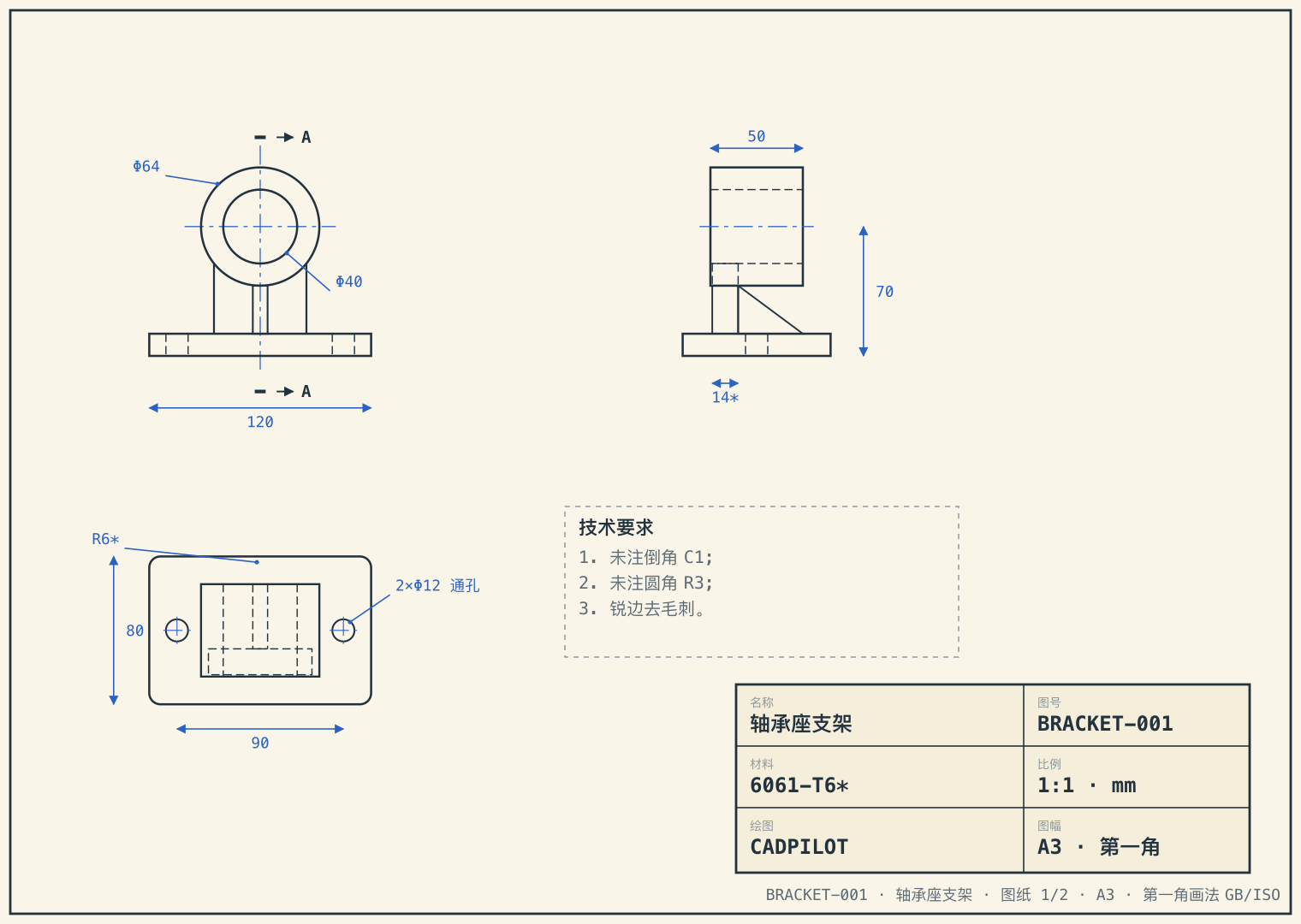
Cadpilot - image-driven CAD replication. Upload 2D engineering drawings, get back an editable parametric 3D model with STEP AP242 output, build123d source, and a written assumptions list. It stops and asks when unsure — and runs privately so drawings never leave your intranet.
Try Cadpilot ↗Cadpilot turns 2D engineering drawings into 3D models you can actually edit. Upload your drawings, and it rebuilds the part as a parametric CAD model — then hands over STEP AP242, build123d source code, and a written list of every assumption it made. When it's unsure about something, it stops and asks.
Replicate engineering drawings into 3D models that can be edited.
What is Cadpilot
Feed it 2–6 complete drawings of a part. Cadpilot reads the views and dimensions, rebuilds the geometry as a parametric model on the OCCT kernel, checks its own work against the original views, and delivers:
- STEP AP242 and STL for downstream tools
- build123d parametric source — dimensions are live parameters, not baked numbers
- A dimensions & assumptions document — every default value it filled in, stated openly
- A local interactive preview in the browser, nothing to install
Three kinds of "image-to-3D" — only one belongs in the shop
Most AI image-to-3D output is for eyes, not machines:
- Mesh / STL — looks photo-realistic, but hole spacing is never guaranteed. Good for renders, useless for machining.
- STEP without a feature tree — mathematically correct, but with no modeling history. Any change means starting over.
- Cadpilot's delivery layer — a build123d parametric feature tree. Change a dimension and the model regenerates, like editing a cell in Excel and watching the formulas recompute.
The test it holds itself to: is the output for people to look at, or for machines to eat?
How it works
1. Drawing understanding — views are segmented automatically, dimensions read, sections and detail views handled, title blocks stripped out.
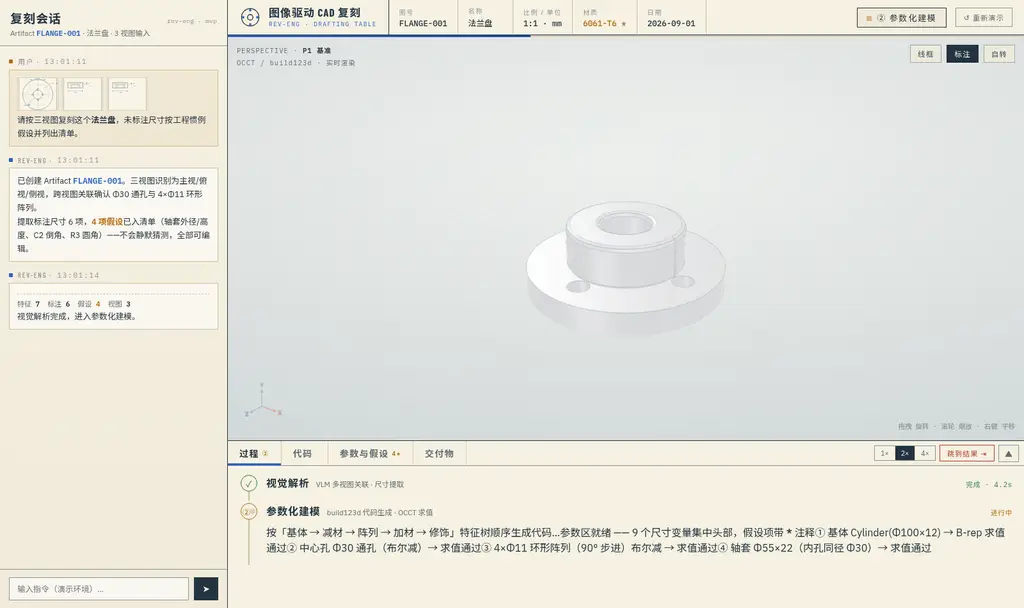
2. Parametric modeling — geometry is built in order (base body → subtractive features → patterns → fillets) as build123d code, executed on the OCCT kernel.
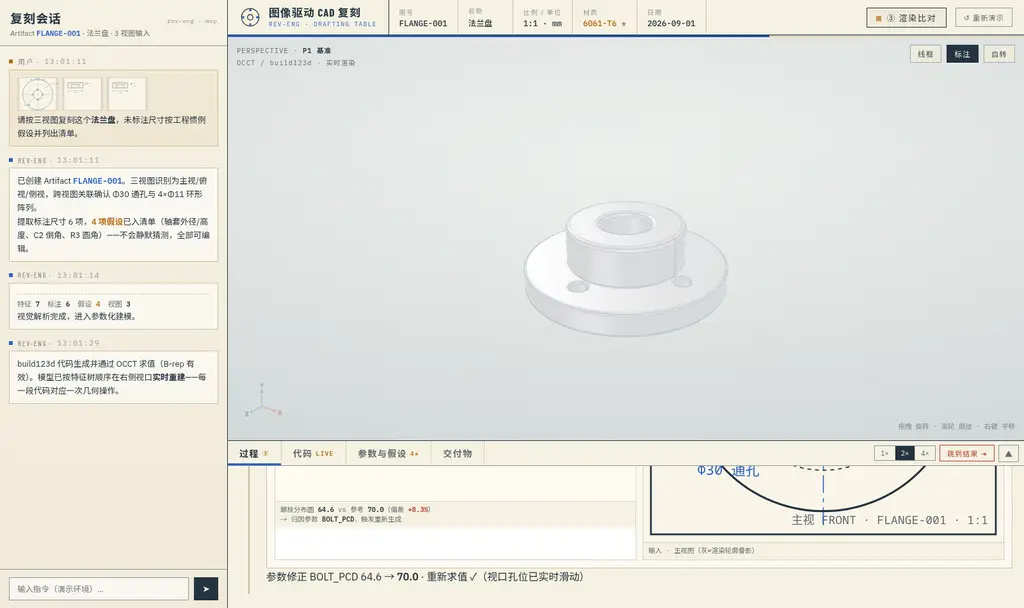
3. Compare & converge — the model is re-rendered from the original drawing's viewpoints and overlaid for comparison, with hard checks on dimensions. Deviations are corrected automatically.
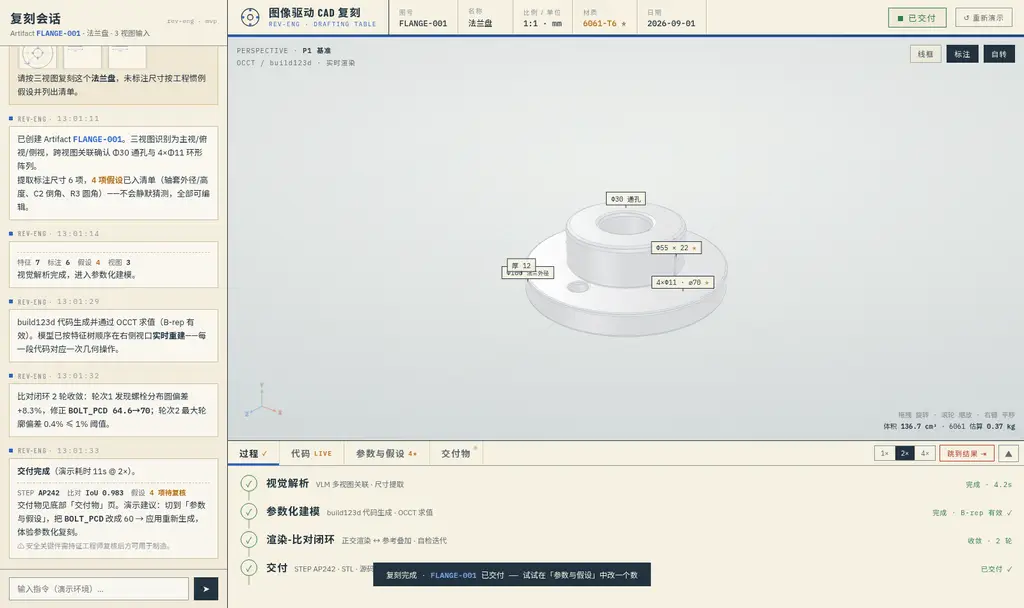
4. Delivery — STEP AP242, STL, parametric source, the assumptions list, and an in-browser preview that runs locally.
Why multiple drawings? A single view is mathematically underdetermined — the same circle could be a through-hole, a boss, or a sphere. Multiple views cross-confirm until the model converges.
It stops and asks when unsure
This is the part most AI tools skip.
- Interactive confirmation — when a judgment scores below a confidence threshold (say, a section view at 0.55 against a 0.60 threshold), Cadpilot pauses and waits for you to click, instead of guessing.
- An assumptions list — undimensioned sizes get engineering-convention defaults, stated explicitly: 6061-T6 material, rib thickness, R6 base fillets. Nothing silent.
- A dual-loop self-check — bad generated code is repaired automatically, then verified by render-and-compare. Anything that can't be fixed escalates to a human.
- An honest metric — Cadpilot tracks its "one-shot usable rate": the share of parts usable for quoting and reference without modification. The north-star target is ≥40%, and it's reported as-is.
A worked example
The site ships with a built-in demo: two scanned blueprints of a retired equipment bracket — three views, a section, a detail view, and four undimensioned sizes.
- Cadpilot paused on a projection judgment it wasn't confident about; the human confirmation avoided a mirrored part.
- Delivered with a hole spacing corrected from 88.0 to 90.0 against the drawing, and a final profile deviation of 0.4%.
- After review, changing one parameter in the source (
BOLT_X,BOSS_Z,RIB_T) and re-running regenerates the part.
Best suited to medium-complexity 3-axis CNC machined parts. The demo data is built-in sample material, not customer work.
Your drawings never leave the intranet
- Private deployment — a single machine via docker compose; drawings don't touch any cloud.
- No training on your drawings — customer data is never used for training.
- Open standards, no lock-in — STEP AP242 in and out, open-source kernel, and the generated source is plain build123d Python.
- Escalation by default — repeated failures route to human review automatically.
Safety-critical parts still require review by a licensed engineer before manufacturing — Cadpilot says so itself.
Try Cadpilot
- Website: cadpilot.evanworks.dev
Built for real needs, because real needs are always valuable.